


- August 15, 2025
- by Gulam Robbani Shazu
- SEO News
- 0 Comments
WordPress search is often frustrating—for users and site owners alike.
Traditional keyword-based search fails to understand intent, context, or meaning.
Semantic search changes that by delivering smarter, more relevant results.
In this guide, you’ll learn how to implement semantic search in WordPress to improve UX and SEO.
This detailed guide takes you through every step of implementing semantic search in WordPress. Discover how semantic search functions, why it’s a crucial feature for modern websites, and how to seamlessly integrate it using top plugins and proven techniques.
By the end of this guide, your WordPress site will offer intelligent search capabilities that understand user intent, improve engagement, and boost your SEO performance.
Exploring Semantic Search: Moving Beyond Keywords
Semantic search represents a fundamental shift from traditional keyword matching to understanding the context and intent behind search queries. Instead of simply looking for exact keyword matches, semantic search analyzes the relationship between words, concepts, and user intent.
How Semantic Search Works
This innovative method combines natural language processing (NLP) with machine learning to provide highly accurate, user-centric results. By understanding the intent behind a query, semantic search creates a more intuitive and seamless user experience.
Contextual Understanding
Semantic search engines analyze the complete context of a search query. For example, if someone searches for “top SEO agency in USA,” semantic search understands they are looking for leading digital marketing agencies, not general information about SEO or agencies in other fields.
Natural Language Processing (NLP)
Advanced NLP algorithms analyze human language patterns to understand synonyms, related terms, and conversational queries. This allows users to perform searches naturally, such as “best digital marketing agency in California,” rather than relying on simplified phrases like “digital marketing agency California.”
Machine Learning Integration
Machine learning algorithms evolve by analyzing user behavior, continually enhancing search accuracy. They track which results users click on, how long they engage with pages, and the follow-up searches they conduct, refining their performance over time.
Benefits of Semantic Search vs Keyword Search
Improved Search Accuracy
Semantic search delivers more precise results by understanding query intent rather than relying solely on keyword density. Users find what they’re looking for faster, reducing bounce rates and improving user satisfaction.
Enhanced User Experience
Visitors can search using natural language, making your site more intuitive and user-friendly. This is particularly valuable as voice search adoption continues growing.
Better SEO Performance
Search engines favor sites with semantic search capabilities because they provide superior user experiences. This can improve your overall search rankings and organic traffic.
Why WordPress Sites Need Semantic Search
WordPress powers over 40% of websites worldwide, but its default search functionality remains surprisingly basic. The standard WordPress search only matches exact keywords in post titles and content, often missing relevant results that use synonyms or related terms.
Enhancing User Experience
Today’s users demand smarter search functionality. A search for “budget-friendly social media manager” should deliver results like “affordable digital marketing services,” “cheap solutions,” or “cost-effective options”—not just content that matches the exact phrase “budget-friendly social media manager.”
Improving Content Visibility
Semantic search enhances the discoverability of your content, making it more effective than ever. For instance, that in-depth guide you wrote on “digital marketing strategies” can now appear in search results for related terms like “online promotion techniques” or “internet advertising methods.”
Staying Competitive
Leading search engines like Google have relied on semantic search technology for years. By integrating similar functionality into your WordPress site, you can align with user expectations while staying ahead in a competitive market.
Step-by-Step Guide: Implementing Semantic Search in WordPress
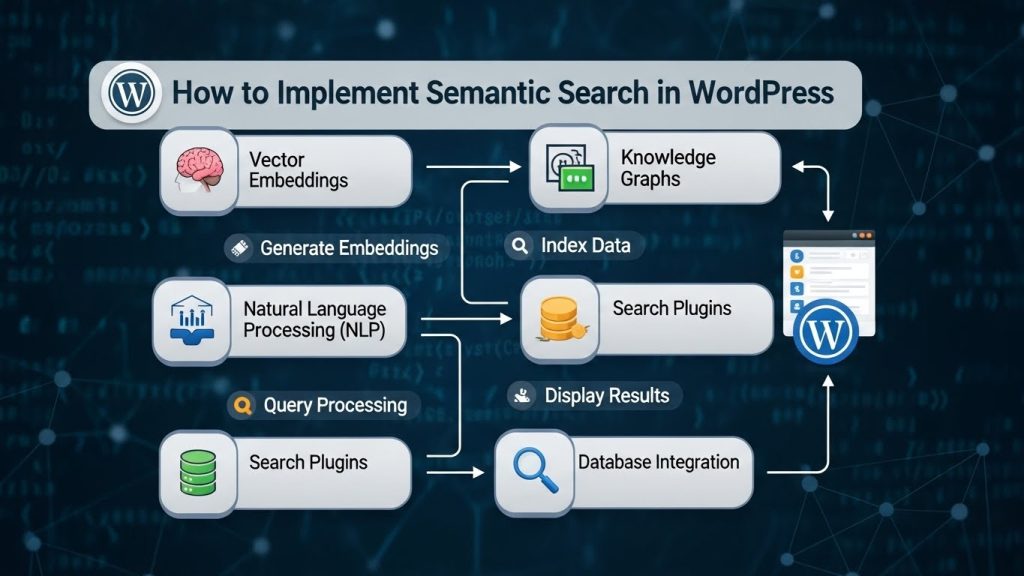
Step 1: Choose the Right Semantic Search Plugin
Numerous WordPress plugins provide semantic search functionality, each offering unique features and pricing options. Choosing the right plugin depends on your website’s size, budget, and specific technical needs.
Key Features to Look For:
- Natural language processing capabilities
- Synonym and related term recognition
- Search result ranking algorithms
- Analytics and performance tracking
- Easy integration with existing themes
Step 2: Install Your Chosen Plugin
Once you’ve selected a plugin, installation follows the standard WordPress process:
- Navigate to Plugins > Add New in your WordPress dashboard
- Search for your chosen semantic search plugin
- Click Install Now and then Activate
- Access the plugin settings from your WordPress admin menu
Step 3: Configure Basic Settings
Most semantic search plugins require initial configuration to work effectively:
Search Scope Configuration
Determine which content types to include in search results—posts, pages, custom post types, or specific categories. Most sites benefit from including all public content types.
Language and Regional Settings
Configure the plugin for your primary language and target audience location. This affects how the algorithm interprets search queries and synonyms.
Search Result Display Options
Customize how results appear to users, including snippet length, thumbnail display, and result ordering preferences.
Step 4: Integration with Existing Search
Replace your current WordPress search functionality with the semantic search plugin. This typically involves:
- Updating search form templates
- Modifying search result page layouts
- Ensuring mobile responsiveness
- Testing search functionality across different devices
Best Semantic Search Plugins for WordPress
SearchWP
SearchWP offers robust semantic search capabilities with extensive customization options. It works by creating a comprehensive index of your content and understanding relationships between different terms and concepts.
Key Features:
- Custom search algorithm controls
- Support for custom fields and metadata
- PDF and document content indexing
- Integration with popular WordPress themes
- Detailed search analytics
Pricing: Starts at $99/year for single site license
Relevanssy
Relevanssy provides advanced search functionality with fuzzy matching and stemming capabilities. It’s particularly effective for large sites with extensive content libraries.
Key Features:
- Fuzzy matching for typo tolerance
- Search term highlighting
- Custom field searching
- Category and tag weight adjustments
- Comprehensive logging and statistics
Pricing: Free version available; premium features start at €99/year
ElasticPress
ElasticPress integrates WordPress with Elasticsearch, providing enterprise-level search capabilities. It’s ideal for large sites requiring high-performance search functionality.
Key Features:
- Real-time content indexing
- Faceted search capabilities
- Autosuggest functionality
- Advanced filtering options
- Scalable architecture
Pricing: Free open-source version; hosted solutions vary by usage
Optimizing Content for Semantic Search
Using Latent Semantic Indexing Keywords
LSI keywords are semantically related terms that complement your primary keywords. For instance, rather than repeatedly using “WordPress security” in an article, you can enhance your content by integrating related phrases such as “website protection,” “site safety,” and “cybersecurity measures.” This approach not only improves readability but also strengthens your content’s relevance.
Research LSI Keywords:
- Use Google’s “Searches related to” suggestions
- Analyze competitor content for semantic variations
- Leverage tools like LSIGraph or Google’s Keyword Planner
- Study Google’s autocomplete suggestions for related terms
Creating Comprehensive, Authoritative Content
Semantic search algorithms prioritize in-depth, authoritative content that provides thorough coverage of a topic. Rather than publishing several short posts on related subjects, focus on crafting comprehensive guides that fully address user questions and needs.
Content Optimization Strategies:
- Answer common questions within your content
- Include relevant examples and case studies
- Use clear headings and subheadings for content structure
- Incorporate multimedia elements like images and videos
- Link to related internal content
Structuring Content for Semantic Clarity
Well-structured content helps semantic search algorithms understand your content hierarchy and relationships between different topics.
Best Practices:
- Use descriptive headings that include semantic variations
- Implement logical content flow from general to specific
- Include clear introductions and conclusions
- Use bullet points and numbered lists for readability
- Add internal links between related content pieces
Measuring Semantic Search Success
Key Performance Metrics
Search Success Rate
Track the percentage of searches that result in users clicking on results. Higher success rates indicate your semantic search is effectively understanding and matching user intent.
Time to Result
Measure how quickly users find relevant results. Semantic search should reduce the time users spend searching and increase time spent consuming content.
Search Refinement Rate
Monitor how often users modify their initial search queries. Lower refinement rates suggest your semantic search is delivering relevant results on the first attempt.
Analytics Tools and Implementation
Google Analytics Integration
Set up custom events to track search behavior, including popular search terms, click-through rates, and user paths after searching.
Plugin-Specific Analytics
Most semantic search plugins include built-in analytics dashboards showing search volume, popular queries, and result performance.
User Feedback Collection
Implement feedback mechanisms asking users about search result relevance and overall search experience satisfaction.
Advanced Semantic SEO Techniques
Schema Markup Implementation
Schema markup helps search engines understand your content context, improving both on-site semantic search and external SEO performance.
Essential Schema Types:
- Article schema for blog posts and guides
- FAQ schema for question-and-answer content
- How-to schema for instructional content
- Organization schema for business information
- Product schema for e-commerce sites
Knowledge Graph Integration
Connect your content to broader knowledge networks by referencing authoritative sources and using consistent entity mentions throughout your site.
Implementation Strategies:
- Link to Wikipedia and other authoritative sources
- Use consistent naming conventions for people, places, and concepts
- Implement breadcrumb navigation
- Create topic clusters around main themes
- Maintain consistent brand entity mentions
Voice Search Optimization
Optimize for voice queries by incorporating conversational language patterns and long-tail keywords that match how people naturally speak.
Voice Search Optimization Tactics:
- Include question-based headings
- Write in conversational tone
- Target local search queries
- Optimize for mobile devices
- Focus on quick, direct answers
Many businesses hesitate to adopt semantic SEO strategies because they misunderstand how modern SEO actually works.
Common Challenges and Solutions
Managing Inaccurate Results
Sometimes semantic search algorithms may return irrelevant results due to ambiguous terms or insufficient training data.
Solutions:
- Regularly review and refine search result quality
- Use plugin settings to adjust term weighting
- Implement negative keyword lists for problematic queries
- Monitor user behavior to identify problem areas
- Continuously update and optimize content for clarity
Handling Large Content Volumes
Large WordPress sites may experience performance issues when implementing semantic search due to extensive content indexing requirements.
Performance Optimization:
- Configure incremental indexing for large content libraries
- Optimize server resources and database performance
- Implement caching strategies for search results
- Consider cloud-based search solutions for scalability
- Regular database maintenance and optimization
Balancing Accuracy with Speed
Finding the right balance between search accuracy and response time requires ongoing optimization and testing.
Optimization Strategies:
- A/B test different algorithm settings
- Monitor search response times
- Optimize content indexing schedules
- Implement smart caching mechanisms
- Regular performance audits and improvements
The Future of WordPress Search
Artificial intelligence and machine learning continue advancing, making semantic search increasingly sophisticated and accessible for WordPress sites of all sizes.
Emerging Technologies
AI-Powered Search Enhancement
New AI models provide even better natural language understanding, making search results more accurate and contextually relevant.
Personalization Integration
Future semantic search implementations will learn individual user preferences, delivering increasingly personalized search experiences.
Cross-Platform Search Optimization
Semantic search will extend beyond individual WordPress sites, connecting with broader web knowledge networks for enhanced result quality.
Taking Action: Your Next Steps
Implementing semantic search in WordPress transforms user experience and can significantly impact your site’s success. Start by evaluating your current search functionality and identifying areas for improvement.
Choose a semantic search plugin that matches your technical requirements and budget constraints. Begin with basic implementation, then gradually optimize based on user behavior and performance metrics.
Remember that semantic search optimization is an ongoing process. Regular monitoring, content optimization, and technical adjustments ensure continued improvement in search accuracy and user satisfaction.
The investment in semantic search technology pays dividends through improved user engagement, better SEO performance, and competitive advantage in your industry. Your users will appreciate more intuitive search functionality, and you’ll benefit from increased site engagement and content discoverability.
Frequently Asked Questions
What is an example of a semantic search?
A semantic search example: When someone searches for “apple nutrition facts,” semantic search understands they want information about the fruit’s nutritional content, not Apple company’s employee health programs, even though both topics contain the word “apple.”
How to implement semantic feature analysis?
Implement semantic feature analysis by identifying key content themes, mapping related terms and concepts, using LSI keyword research tools, and structuring content to show relationships between different topics and ideas.
What algorithm is used in semantic search?
Semantic search uses various algorithms including natural language processing (NLP), machine learning models, vector space models, and knowledge graph algorithms that understand word relationships and context rather than just keyword matching.
Does ChatGPT use semantic search?
Yes, ChatGPT and similar AI models use semantic understanding to interpret queries and provide contextually relevant responses, though they operate differently from traditional semantic search engines.
Is Google a semantic search engine?
Yes, Google has used semantic search technology since 2013 with its Hummingbird update, focusing on understanding user intent and query context rather than just matching keywords.
How to make semantic search better?
Improve semantic search by optimizing content with LSI keywords, implementing schema markup, creating comprehensive topic coverage, using natural language patterns, and regularly analyzing search performance metrics.
What is better than semantic search?
While semantic search is currently the most advanced widely-available search technology, future developments may include more sophisticated AI-powered personalization, real-time learning algorithms, and enhanced cross-platform knowledge integration.
Is semantic search NLP?
Semantic search heavily relies on NLP (Natural Language Processing) as one of its core components, but it also incorporates machine learning, knowledge graphs, and other technologies to understand and process search queries.